 English
 Türkçe
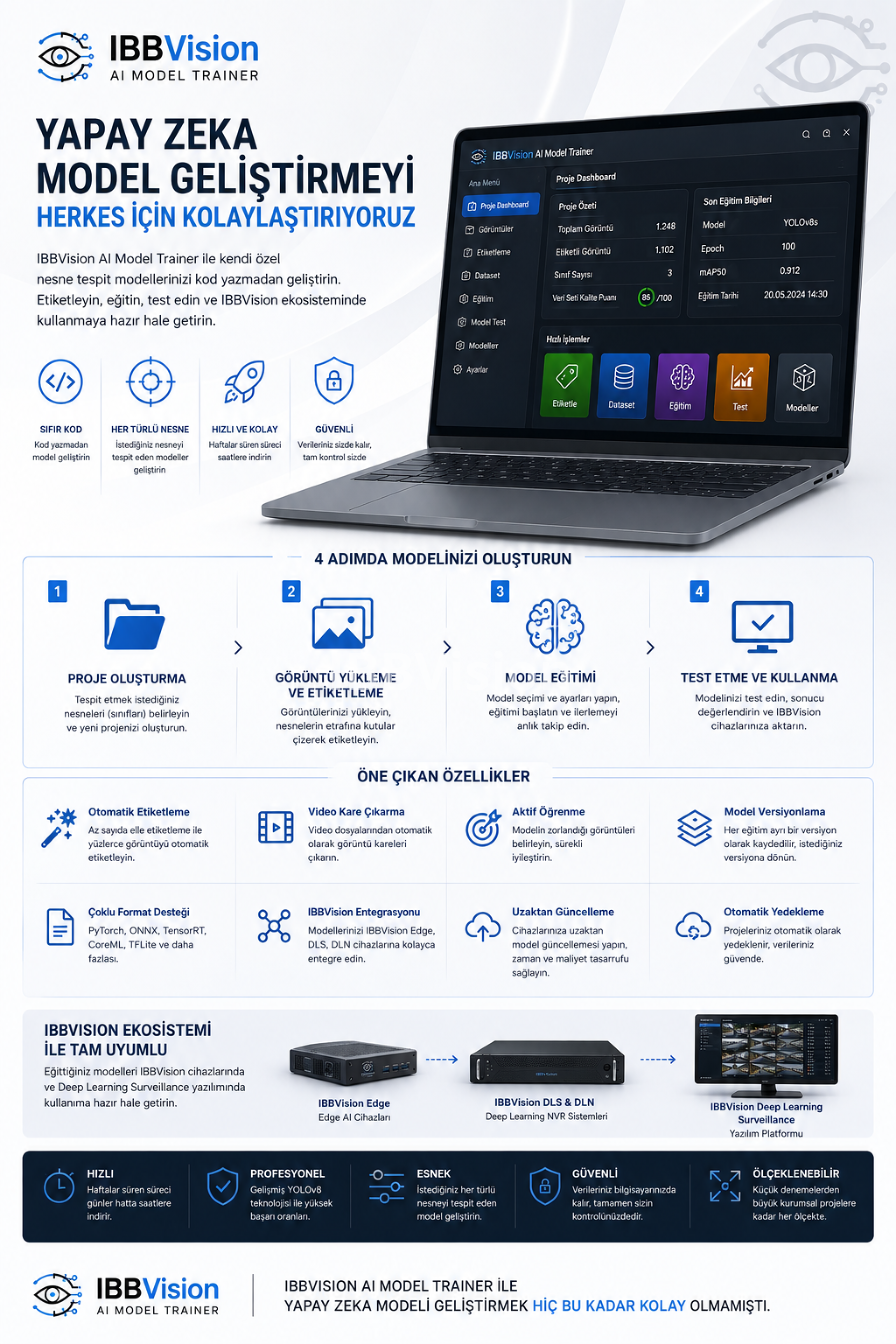
IBBVision AI Model Trainer
IBBVision AI Model Trainer is a professional desktop software that enables you to develop your own custom object detection models without writing a single line of code. Simply upload your images, label the objects, start the training process, and obtain a production-ready artificial intelligence model.
This product has been specifically developed for devices within the IBBVision ecosystem. Models you develop with IBBVision AI Model Trainer allow you to create AI Vision Analysis Modules and enhance existing modules, exclusively for use on IBBVision devices and within the IBBVision Deep Learning Surveillance software.
Offered as a licensed product, this software is a vital component of the IBBVision product family.
Why IBBVision AI Model Trainer?
Developing an AI model using traditional methods involves numerous technical steps: image collection, labeling, coding, dataset preparation, tuning training parameters, and testing. This process can take weeks and requires specialized expertise.
IBBVision AI Model Trainer consolidates all these steps into a single program. You can develop your model through an intuitive visual interface—no coding required. The models you develop integrate seamlessly into the IBBVision ecosystem and can be used directly within IBBVision Deep Learning Surveillance software.
What Can You Do?
With the program, you can develop AI Vision Analysis Modules that detect any type of object, including:
-
Consumer products (cola cans, water bottles, juice boxes)
-
Security elements (people, vehicles, helmets, vests)
-
Industrial parts (machine components, product defects)
-
Agricultural products (fruits, plants)
-
Anything you need for your custom projects
You can detect multiple different objects within the same model. The modules you develop are designed for use with IBBVision Deep Learning Surveillance software.
How Does It Work?
Using the program consists of four fundamental steps:
1. Project Creation
You create a new project in the program and define the objects (classes) you want to detect—for example, "cola can" and "water bottle."
2. Image Uploading and Labeling
You upload your images into the program. For each image, you draw rectangular bounding boxes around the objects you want to detect using your mouse. You assign each box to its corresponding object class. If you have a large number of images, you can take advantage of the auto-labeling feature.
3. Model Training
Once labeling is complete, click the "Start Training" button. Configure a few settings—such as model selection and number of epochs—and start the training process. You can monitor the progress on-screen in real time. Upon completion, the most successful model is automatically saved.
4. Testing and Deployment
Test your trained model on new images, video files, or live camera feeds. If you are satisfied with the results, you can transfer the model directly to your IBBVision devices and begin using it within IBBVision Deep Learning Surveillance software.
Key Features
Zero Coding Required
Open the program and perform all operations with mouse clicks—no programming knowledge necessary.
Auto-Labeling
You don't have to label hundreds of images manually one by one. First, manually label a small set of images and train an initial model. The program then uses this model to automatically label the remaining images—you only need to correct any mislabeled ones.
Video Frame Extraction
Automatically extract image frames from video files, allowing you to quickly convert your existing video recordings into a dataset.
Active Learning
The program identifies which images your model struggles with the most and presents them to you. By correcting these images and retraining, you can continuously improve your model's performance.
Model Versioning
Every training session is saved as a separate version. You can compare the performance of different versions and revert to any previous version at any time.
Multi-Format Export Support
Export your trained models in various formats, including PyTorch, ONNX, TensorRT, CoreML, and TFLite.
IBBVision Integration
Send your trained models directly to IBBVision Edge, DLS, and DLN devices. With remote update support, you can update your devices without physically visiting them. All your developed modules work seamlessly with IBBVision Deep Learning Surveillance software.
Automatic Backup
Your projects are automatically backed up. You can restore from a backup at any time.
Who Can Use It?
The program caters to everyone—from users with no AI background to expert developers. It is specifically designed for all users of the IBBVision ecosystem.
Security Professionals – Develop person, vehicle, helmet, and vest detection models.
Industrial Users – Perform product quality control, defective product detection, and production line analysis.
Agricultural Professionals – Conduct fruit detection, diseased area identification, and crop counting.
Retail Sector – Implement product detection, shelf analysis, and inventory management.
Custom Projects – Develop tailor-made object detection models for any client-specific need.
System Requirements
The program runs on Windows 10 and Windows 11 computers.
-
Processor: Intel Core i5 or equivalent (recommended: i7 or Ryzen 7)
-
RAM: Minimum 8 GB (recommended: 16 GB)
-
Storage: Minimum 20 GB free space (recommended: 50 GB or more)
-
Graphics Card: Recommended: NVIDIA GTX 10xx series or higher, 6 GB VRAM
A graphics card (GPU) is not mandatory, but it significantly accelerates training. Without a GPU, training may take 10–20 times longer.
Where Can You Use Your Models?
You can primarily use your trained models within the IBBVision ecosystem:
-
IBBVision Edge devices
-
IBBVision DLS and DLN systems
-
IBBVision Deep Learning Surveillance software
Additionally, by exporting the model in different formats, you can use it in:
-
Your own Python projects
-
Other programming languages via ONNX format (C++, C#, Java)
-
Mobile devices (CoreML for iOS, TFLite for Android)
-
Web applications
Why Choose IBBVision AI Model Trainer?
-
Exclusive to IBBVision Ecosystem: All your developed models are fully compatible with IBBVision devices and Deep Learning Surveillance software.
-
Simple: All operations are performed via a visual interface—no coding required.
-
Fast: Reduces model development time from weeks to days or even hours.
-
Professional: Achieve high accuracy rates with advanced YOLOv8 technology.
-
Flexible: Develop models that detect any object you need.
-
Secure: Your data never leaves your computer—it remains entirely under your control.
-
Scalable: Suitable for everything from small experiments to large enterprise projects.
IBBVision AI Model Trainer is a proprietary product licensed under IBBVision. All rights reserved.
| Shop Location |